
Short answer: Here’s how to write a status update for executives: lead with the verdict. Is this good news or bad news? Then say whether the main issue is a risk or a return, and close the top section with your own recommendation. Facts and detail come after. Executives decide how to read your update from its first two lines, so put the judgment there, not at the bottom.
Updated November 2026
Most status updates are written in the order the work happened. That’s natural for the writer and backwards for the reader.
I’ve spent years on both sides of this: writing updates for a chairman and senior executives, and later receiving them. When I open an update, the very first thing I want to know isn’t what was done. It’s whether this is good news or bad news. Everything else I read gets filtered through that answer.
This guide shows how to write a status update for executives with a three-part format built around that reality, a template you can copy, and an example of the same update written badly and well.
Table of Contents
What do executives look for first in a status update?
They look for the direction of the news. Before any detail, an executive wants to know whether the project is on track or in trouble, and whether they need to act. If the update doesn’t say that in the first two lines, they’ll either skim for it or ask you, which means the update has already failed.
This is why “here’s what we did this week” is the weakest possible opening. It forces the reader to work out the conclusion from your raw activity. Senior readers won’t do that work. They’ll jump to the end, or reply with one line: “So what’s the bottom line?”
How to write a status update for executives: the Verdict-First format
A Verdict-First Update opens with three things, in order: the Verdict (good news or bad news), Risk or Return (is this mainly a risk or an upside, and how big), and your Recommendation (what you think should happen). Progress details, facts, and next steps follow underneath.
1. Verdict: good news or bad news?
One line. On track. Slipping by two weeks. Ahead of budget. Blocked. If you use traffic-light colors, the color goes here, but write the words too. A green dot doesn’t say why it’s green.
2. Risk or Return: say it up front
Here’s the move most people miss. In a typical report, risk factors sit near the bottom, in a section nobody reaches.
Move them up. When I started telling executives at the very beginning whether a matter was fundamentally about risk or about return, the meetings changed. Once the reader knows which lens to use, they think in that direction for the rest of the update, and they think harder. More than once, the way to avoid the risk came out of the discussion itself, because the executive was focused on it from minute one instead of discovering it on the last page.
Write it as one sentence with a size attached: “Main risk: the vendor delay could push launch past the Q1 budget cycle (about $40K impact).”
3. Recommendation: your view, not just your facts
This is what separates a report from a data dump. The executive makes the decision, but you know the work better than anyone in the room, and that’s exactly why they want your view.
So say it: “I recommend we approve the second vendor now.” Or, if nothing is needed: “No action needed. I’ll flag it if the date moves again.”
Status update template for executives (copy and paste)
Keep the top three lines readable on a phone without scrolling. If someone reads only those, they should be able to reply with a decision.
Subject: [Project] — [Verdict in 3–5 words]

VERDICT: [On track / At risk / Off track] — [one-line reason]
RISK OR RETURN: [Risk / Return]: [what could happen] ([size: money, days, people])
RECOMMENDATION: I recommend [action]. [Decision needed by DATE / No action needed]

Progress since last update
- [Result, not activity — what changed]
- [Result]

What's next
- [Next milestone] — [owner] — [date]

Background (optional)
- [Only what supports the three lines above]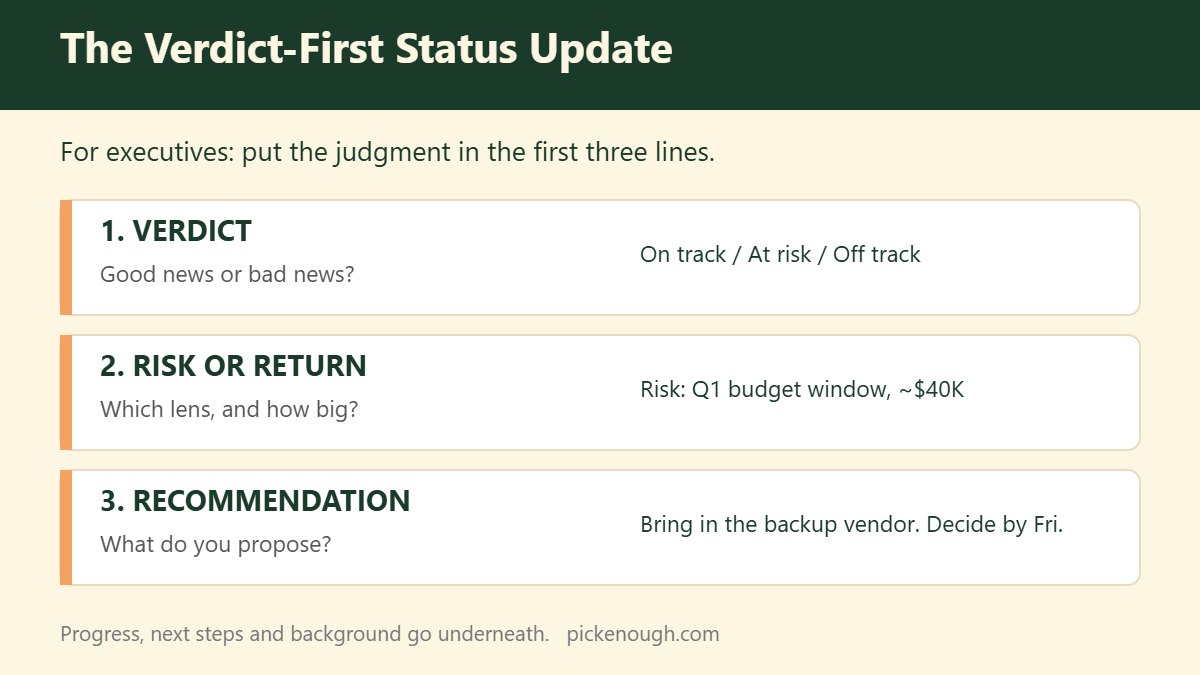
Bad vs. good: the same update, written two ways
Bad (activity first, no recommendation):
This week the team completed integration testing on modules A and B. We held two calls with the vendor about the API issue. QA found 14 defects, 9 of which are fixed. The vendor has indicated the fix may take longer than expected. Design review is scheduled for Thursday. Please advise on how to proceed.
The reader has to dig out that the project is slipping, guess how much it matters, and decide with no input from the person who knows the most. “Please advise” hands the whole problem upward.
Good (Verdict-First):
VERDICT: At risk. Launch likely slips 2 weeks.
RISK OR RETURN: Risk. The vendor’s API fix is late; a 2-week slip misses the Q1 budget window (about $40K).
RECOMMENDATION: Bring in our backup vendor for the API piece now. Decision needed by Friday.
Progress: integration testing done for modules A and B; 9 of 14 QA defects fixed.
Next: design review Thursday (Mina); backup vendor quote by Wednesday (me).
Same facts. The second version can be answered in one reply. (The names and numbers are illustrative.)
What if the update is mostly bad news?
Lead with it anyway. Bad news buried under progress reads as hiding, and executives notice. Put the problem in the Verdict line, size it in Risk or Return, and bring a fix in your Recommendation. A problem with a proposed fix is a decision. A problem alone is a burden.
If the bad news is a schedule slip, I wrote a full guide on that conversation: How to tell your boss a project is behind schedule.
And if the update is really a request for a big decision, a status update is the wrong container. Use a one-page decision memo instead.
Need your boss to decide something by a date? Put the decision, your options, and the answers to their likely questions in one message: how to ask your boss to make a decision.
Common mistakes that make executives stop reading
- Waiting for a decision with no opinion attached. “Please advise” with no recommendation. The executive wants your judgment, not only your facts.
- Pure fact lists. Accurate, complete, and no insight. A list of facts is raw material, not a report.
- Risk on the last page. By the time they reach it, they’ve already formed a view in the wrong direction.
- Activity instead of results. “Held three meetings” isn’t progress. “Vendor agreed to a fixed date” is.
- No owners on next steps. If nobody’s name is next to it, it won’t happen. More on that in how to follow up on action items after a meeting.
Free: 8 copy-paste templates like the one above (Boss Communication Kit). Get the free kit →
Frequently asked questions
What should you include in a status update for executives?
The verdict (on track or not), the main risk or return with its size, your recommendation, results since the last update, and next steps with owners and dates. Keep the first three at the top.
How long should an executive status update be?
The decision part should fit in three lines. Total length matters less than whether a reader can act after the first screen.
How do I write a status update email to leadership?
Put the verdict in the subject line, open with Verdict, Risk or Return, and Recommendation, then list progress and next steps. Use the template above.
Should I include problems in a status update?
Yes, and near the top. Executives are more troubled by surprises than by problems. Pair each problem with a proposed fix.
What is the difference between a status update and an executive summary?
A status update tracks an ongoing project over time; an executive summary condenses a single report or proposal. Both should lead with the conclusion.
📬 Pick Enough Weekly
Weekly notes on deciding well and reporting clearly at work.
🎁 Free: the Boss Communication Kit —
8 copy-paste templates for status updates, delays, deadlines, decisions and escalations.