
Short answer: Here’s the best AI for writing reports at work, step by step: use Gemini for research (it’s wired into Google), draw the structure yourself, cross-check every number in ChatGPT, Claude, and Gemini and then against the source, and polish the prose in Claude. Write the conclusion yourself. Over time, the AI you use most will beat the “best” one, because it has learned how you think.
Updated November 2026
Most “best AI for reports” lists compare report-generator tools: dashboards, templates, data connectors. That’s not what most people need. If you write project updates, market reviews, or proposals for your leadership, the real question is simpler: which of the three big assistants should you open, and for which part of the job?
I write reports for senior executives, and I use all three. Not interchangeably. Each one has a job, and two jobs belong to me.
Table of Contents
Which AI is best for writing reports at work?
None of them wins the whole report. Gemini is best for gathering market and trend material because it searches with Google. Claude is best for turning a rough draft into clear, natural prose. All three together are best for checking numbers. The structure and the conclusion should stay human.
| Report step | Best AI | Why | Who decides |
|---|---|---|---|
| Research and market data | Gemini | Searches with Google and pulls sources together | AI, then you check |
| Big-picture structure | None | You know what the reader needs to decide | You |
| First draft | The one you use most | It already knows your tone and logic | AI, then you edit |
| Number check | ChatGPT + Claude + Gemini | Disagreements reveal errors | You, against the source |
| Polish | Claude | Most natural sentence flow | AI, then you approve |
| Conclusion and recommendation | None | It’s your judgment they’re paying for | You |
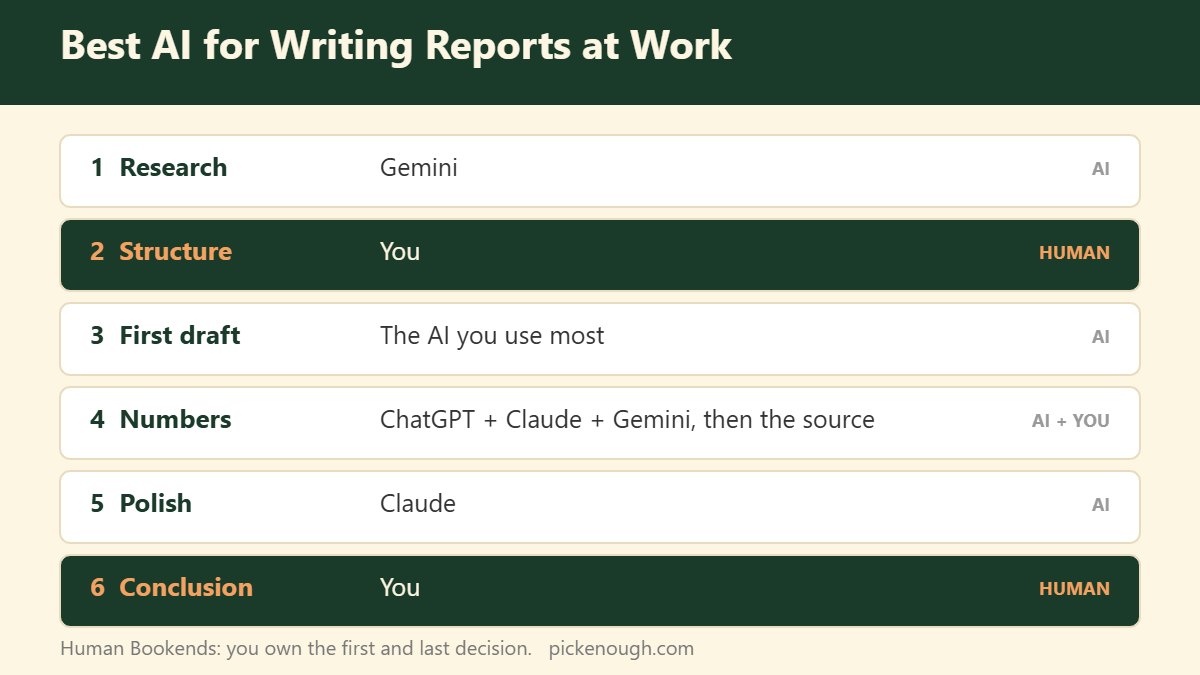
The Human Bookends workflow: you at both ends, AI in the middle
The pattern that works for me is simple: I own the first decision (what the report is about) and the last one (what I recommend). AI does the heavy lifting in between.
1. Research: Gemini
When I need market trends or industry data, I start in Gemini. Because it’s connected to Google Search and the rest of the Google ecosystem, it’s the fastest way to collect recent material in one place. I treat everything it returns as a lead, not a fact, until I’ve opened the source.
2. Structure: you
I draw the big picture myself, almost every time. What decision does the reader face? What’s the one-line answer? What evidence do they need, in what order? AI can suggest outlines, but it doesn’t know what your executive is worried about this quarter. You do.
3. First draft: the AI you use most
Here’s the part most comparisons miss. The AI you’ve been talking to for months writes a better first draft for you than a “better” model you just opened. It has learned your phrasing, the way you build an argument, and what you usually cut. Switching tools every month resets that.
4. Numbers: all three, then the source
I paste the key figures into ChatGPT, Claude, and Gemini and ask each to check them. When one disagrees, I’ve found something to look at. But cross-checking AIs isn’t the end. The most dangerous error I see is a number that’s consistent everywhere in the report, front to back, and still wrong against the real data. Only the original source catches that.
5. Polish: Claude
For the final pass, I use Claude. In my experience its sentences flow the most naturally, and it follows detailed style instructions well. I ask it to tighten, not to rewrite, so the argument stays mine.
Why the AI you already use beats the “best” one
Rankings change every few weeks. In October 2026 alone, OpenAI and Google both shipped new top models. If you chase the leaderboard, you keep starting over.
An assistant you use daily builds up context: your vocabulary, your reporting format, the way you move from fact to implication. That accumulated fit is worth more for routine reports than a few benchmark points. Pick a main assistant, use the others as specialists, and switch only when a specialist is clearly better at one step.
For a broader breakdown of which AI fits which task beyond reports, see my best AI for each task cheat sheet.
3 ways AI-written reports go wrong
- The logic flows, but the business doesn’t. The paragraphs read smoothly, yet the reasoning wouldn’t survive a meeting with someone who knows the market. Fluent isn’t the same as right.
- Facts without a view. A tidy list of findings, no opinion. Executives read reports to hear what the person closest to the work thinks.
- Numbers that agree with each other and not with reality. Internally consistent, cross-referenced, and wrong against the source data.
What should you never let AI write in a report?
The conclusion. I do use AI to reason toward it: I’ll argue with it, ask what I’m missing, test the opposite case. But the final sentence that says “here’s what we should do” is mine. Your opinion and insight are the reason the report has your name on it.
Putting it together: the best AI for writing reports at work, plus a Verdict-First top
Once the report is drafted, the top still has to work for a busy reader. I put the verdict, the main risk or return, and my recommendation in the first three lines. That structure is in my guide on how to write a status update for executives. If the report is really asking for a big decision, use a one-page decision memo instead.
Free: 8 copy-paste templates like the one above (Boss Communication Kit). Get the free kit →
Frequently asked questions
Which AI is best for writing reports at work?
No single AI wins every step. Gemini is strongest for research because it searches with Google, Claude for polishing prose, and all three together for checking numbers. Keep the structure and the conclusion for yourself.
Is ChatGPT, Claude, or Gemini better for business reports?
Use Gemini to gather material, Claude to polish, and ChatGPT as a flexible all-rounder and second opinion. For routine reports, the one you use most often usually produces the best first draft because it knows your style.
Can I trust AI with numbers in a report?
Not on its own. Cross-check figures across several AIs to catch disagreements, then verify against the original data. Numbers can be consistent across a report and still be wrong.
Should AI write the conclusion of my report?
No. Use AI to test your reasoning, but write the conclusion and recommendation yourself. That judgment is what readers want from you.
What is the best AI for writing work emails?
The same split applies: draft in the assistant you use most, polish tone in Claude, and never send numbers or commitments you haven’t checked.
📬 Pick Enough Weekly
Weekly notes on deciding well and reporting clearly at work.
🎁 Free: the Boss Communication Kit —
8 copy-paste templates for status updates, delays, deadlines, decisions and escalations.